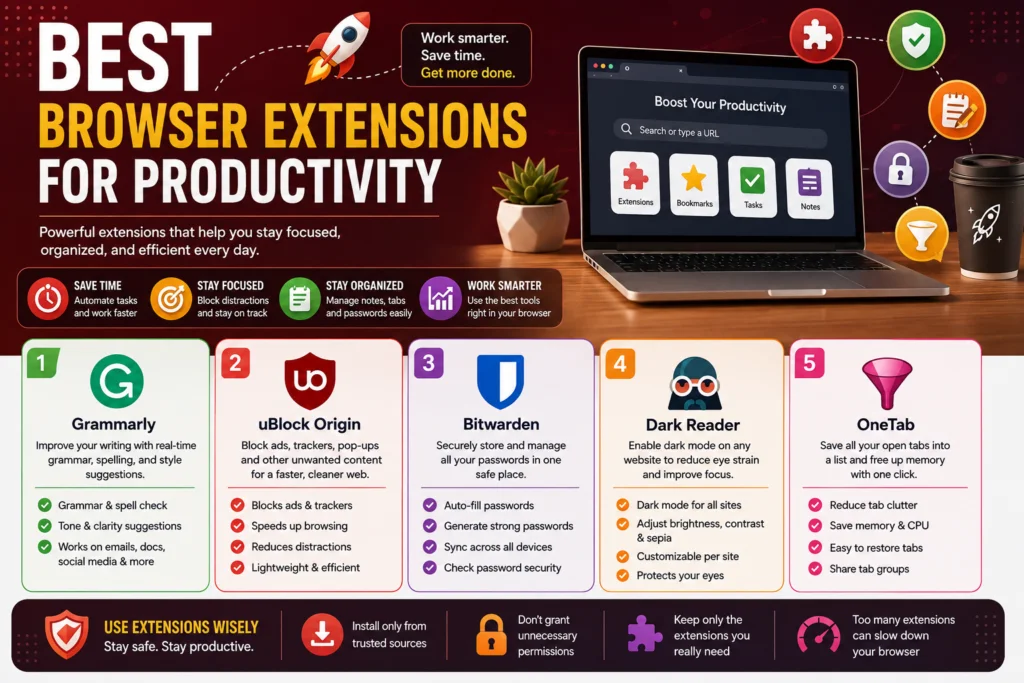
Introduction
Browser extensions have become really useful tools that enhance overall productivity and make day to day tasks easier. Instead of switching between multiple web apps, one can simply install and use a browser extension thus enabling better time management and more efficiency while working or browsing. Browser extensions can help in task management, organization, blocking distractions, note-taking, saving articles for later, writing assistance, automation, and so much more.
Whether one is a student, a professional, a freelancer, or someone who spends long hours working on the internet, browser extensions can be really helpful in saving time and getting more work done. Some extensions help with avoiding distractions while others assist with better organization or make the process of writing emails, taking notes, capturing information, and managing tasks easier.
The best part about such productivity tools is that they are mostly super convenient. One doesn’t have to spend time downloading apps for different purposes since most extensions work seamlessly with browsers.
Some extensions are easy to use and don’t require much technical know-how, which is another reason why they are extremely useful.
However, it is important to choose the extensions one installs very wisely. After all, not all extensions are created equal. Having a ton of random extensions installed can significantly slow down the browser and lead to a poor overall experience. Furthermore, make sure not to grant excessive permissions to extensions and only download them from safe and reliable sources.
In this article, you’ll find a list of the best browser extensions for productivity that can make you more efficient, save you time, and help you get more work done.
Grammarly
Grammarly is a browser extension that helps users while writing online. It highlights errors in the text and offers suggestions for its improvement. The tool is very useful for students, professionals, bloggers, and people who write emails and messages in their day-to-day life. The extension can be very helpful for people who want to improve their writing skills and make their text more understandable. It is a great option for professionals who want to look better in their online communication and writing projects.
The main advantage of using Grammarly is that it operates directly in a browser. After installing the extension, it becomes possible to highlight the mistakes and receive suggestions in the texts while writing them. It is much easier than using separate tools for grammar checking since there is no need to copy-paste the text from one platform to another. Grammarly can be very helpful while writing emails and other types of messages. It can also be used for writing articles and other types of online content.
The tool can help the user to make their writing more clear and attractive. It depends on the options that the people choose and their subscription level. Grammarly offers suggestions about synonyms, word choice, sentence structure, and other tools. For example, it has special functions for writing emails and making them look more professional. The writing suggestions can be useful for people who want to improve their writing skills and work with online content.
The tool is easy to operate and suitable for people who are not familiar with more complex writing and grammar tools. However, some more advanced options are only available with a paid subscription. In general, Grammarly is a great productivity tool for everybody who wants to improve their writing and make it more attractive. It is very convenient since it operates directly in the browser and suggests improvements while writing. People can save time on grammar checking and spend it on more productive activities.
uBlock Origin
uBlock Origin is a free open-source browser extension that allows users to block unwanted content while browsing the web. The software is utilized to eliminate various forms of advertisement, trackers, pop-up windows, and other unnecessary elements that make the browsing experience uncomfortable or slow down the performance of a web browser. This tool has proven to be a useful productivity software as it significantly limits distractions during work or leisure time.
The most notable benefit of using uBlock Origin is that it removes annoying elements from most websites, thus providing a more comfortable and less cluttered experience. Various advertisements, pop-up banners, and trackers that may seem intrusive or irrelevant can be eliminated with this software. Additionally, the tool offers users more control over their browsing experience, as it allows the creation of custom rules or the use of existing ones.
The tool is also convenient because it is a small software that does not put a significant load on the computer and requires few resources to operate. It is an open-source project that can be used by anybody who wishes to improve their browsing experience, although it is important to note that some elements blocked by uBlock Origin can cause certain websites to function improperly. In such cases, it is possible to disable the script for a specific domain.
Overall, uBlock Origin is a useful browser extension that allows users to limit distractions and improve their browsing comfort. It can be utilized in everyday computing activities to provide a more pleasant experience by removing various advertisements and trackers.
Bitwarden
Bitwarden is a browser extension that aims to make the life of an average user easier by allowing them to store the credentials of various websites they use on a daily basis. It enables one to manage all passwords in a safe place and retrieve this information with a simple click of a button. It is especially beneficial for people that have multiple online accounts for work, shopping, socializing, emails, and other activities.
Firstly, Bitwarden can be described as a productivity tool that helps the user avoid spending a considerable amount of time typing the same password numerous times. This can be achieved through an autofill function that saves time and effort in case one has already logged into the account in question. In addition, the extension can propose different strong passwords in case a person wants to change the existing one or has trouble thinking of a secure option. Those passwords could be additionally encrypted and utilized without having to type them manually.
The passwords saved in the Bitwarden database can also be synced on all of the devices a person uses on a regular basis. It ensures that the user will always have access to the information they need regardless of the device they are currently operating on. Furthermore, it is possible to store other types of data retrieved from the website one logs into, including notes, and other relevant information. These items can be sorted conveniently in order to ensure that important accounts are only a few clicks away from being opened.
Finally, a user can benefit from the fact that the passwords can also be checked for security level and whether one utilizes the same password across different accounts since both scenarios pose a serious threat to one’s personal data security. It is also important to highlight that Bitwarden is an open-source product, meaning that the code is available for public review.
To summarize, Bitwarden is a very convenient productivity extension because it enables the user to store all passwords in one secure place while providing an option to autofill when the account needs to be accessed. It allows one to manage online accounts easily while also saving time due to the aforementioned functionality.
Dark Reader
Dark Reader is a convenient browser extension that allows to transform the interface of web pages by replacing the default appearance with dark themes. This tool is designed for people who read articles and work with computers extensively: it helps to protect the eyes from the harmful effects of screens when working in the evening. Instead of customizing the appearance of each site, the extension will take care of everything on your behalf.
The key advantage of Dark Reader is that it will allow to create optimal viewing conditions for each page. When browsing the Internet in dark rooms, most sites look uncomfortable due to their light background. Using this extension neutralizes this effect. Dark Reader changes the color scheme, contrast, brightness, and other parameters to the values that are comfortable for the eyes.
In addition, the described tool gives you full control over the appearance of sites. This means that the user can customize the interface to his liking. He can select the desired parameters for each site individually, choosing which ones will be processed by the extension and which will remain as they are. The ability to change brightness, contrast, and sepia is also available, which is very important in specific situations.
Thus, Dark Reader is extremely relevant for those who work on the Internet a lot and spend a considerable amount of time reading texts. A large number of useful features, the ability to customize, and full control of the interface within the limits of the browser are advantages that cannot be ignored for this type of software. This extension will help to achieve maximum comfort and productivity.
OneTab
OneTab is an innovative addition to browsers aimed at helping users keep control of masses of opened tabs with lots of different pages in them and save the browser’s memory. People tend to accumulate numerous tabs while researching a topic on the Internet, writing essays, watching videos, and performing different tasks. However, such a large number of opened pages may quickly become unmanageable and drain the RAM. OneTab is an easy-to-use extension that helps people save tabs as a numbered list of links and re-open them at a convenient time.
When a user launches the extension, OneTab replaces all of the opened tabs with a page that contains a list of links. The links are labeled with numbers, which implies that the user can click at any of them to get transferred to the corresponding website. Moreover, they can be added to the list or deleted from it any time. Additionally, OneTab can be used to group similar sites, making it easier to sort and manage them.
It goes without saying that the use of OneTab can be beneficial for students, who often have to accumulate a lot of different pages while preparing presentations and writing essays. In addition, the extension can considerably help writers and researchers, who constantly have to surf the web searching for the necessary information, and keep all the required sites in one list. OneTab can be useful for anyone who spends a lot of time on the Internet and accumulates lots of tabs while performing daily tasks.
However, aside from its apparent benefits, OneTab has some apparent disadvantages as well. First, it lacks any advanced features that would allow it to become much more useful for various tasks. Although its interface is easy to use even for people with moderate knowledge of computers, it is essential to remember that all the saved links are contained only in the browser. It means that all the hard work may be lost due to several seconds of negligence.
Explore this related topic here:
7 Ways to Avoid Online Scams
8 Best Free VPN Services to Try in 2026
8 Best Free VPN Services to Try in 2026
Conclusion
Browser extensions make work easier in many cases. They can be used in place of many different apps that would otherwise be needed for similar functions, and are often much more accessible and convenient. Grammarly can help one write better papers, Bitwarden keeps track of all of one’s passwords securely, uBlock Origin blocks distracting ads, and Dark Reader makes the appearance of sites easier on the eyes.
For those who have many tabs open at once, OneTab can prevent tabs from becoming disorganized and lost.
These extensions can be very helpful to students, writers, researchers, and anyone else who uses the internet frequently. While they can be very helpful, one should also be careful not to install unecessary extensions, and should only use extensions they know are safe and are confident in and do not ask for more permissions than are absolutely necessary.