Introduction
Today, video editing is an integral part of any social media, YouTube, website, online courses, or personal video projects. But professional editing software is often too expensive or complicated for ordinary users. Fortunately, there are several excellent free video editing programs that offer a comprehensive set of professional tools to create and edit videos. These applications can edit and cut video, add music and text, apply effects, transitions, colors, and much more.
Top free video editing software is suitable for both beginners and professionals. It allows you to perform all the standard functions: editing, cutting, adding effects and sounds, changing the order of video clips, and adding transitions. Some have multi-track timelines, video editing tools, audio enhancement, color correction, and resolution scaling options. Such programs are often available for PC, Mac, and Linux. Besides, most free video editors are much more accessible and customizable than their paid counterparts.
However, choosing the best free video editing software can be challenging since there are many programs on the market, each of which has its own interface, functionality, and set of tools. For this reason, we have prepared a list of the best free video editing software in this article. We will also discuss the features and benefits of each program and which technologies and platforms it supports. Thus, our article will help you choose the best free video editing software for you.
CapCut
Reviewing the Top Video Editing Tool CapCut as a Newbie and Common User
CapCut is one of the most popular free video editing software that has taken the world by storm. It has proven to be a very useful tool for beginners, social media influencers, and even professional video editors. The platform offers an impressive editing experience and user-friendly interface that enable one to create amazing videos. Using this tool, you can cut, split clips, merge videos and images, add text, sound, effects, and transitions among other features. With these features, CapCut has overtaken many other video editing tools as the number one choice for making TikTok videos, Instagram, YouTube videos and other social media contents.
One of the main reasons why CapCut has become so popular is that it offers a wide range of templates, effects, filters, stickers, and animations that can be used to make amazing videos easily. Other than the amazing effects, one can also tweak and make changes to the speed, remove backgrounds, add captions, and edit audio depending on the version being used.
CapCut has also proven to be useful as it can be used on different operating systems including mobile phones and computers. The tool has a very intuitive interface for merging, trimming, and manipulating video clips using the timeline and drag and drop features.
Some of the best things about this tool are that it provides a huge library of visual effects, stickers, special effects, and animations that can help you make very impressive videos. However, some of the advanced tools and assets are only available on the paid version of the application. As such, it is important to also consider other versions when using the tool. Another consideration when using this tool is the export options and those features that might be limited on certain devices because of restrictions.
In my view, CapCut is indeed a very amazing tool that has revolutionized the way we do video editing, especially for social media influencers and common users. It has provided a competitive advantage for many users because of its wide range of features and ease when using the application. The tool is perfect for social media, short videos, and any other video content as it also offers various advanced effects that can be used to impress your friends and family or even win your favorite social media challenges.
DaVinci Resolve
DaVinci Resolve is one of the leading free video editing software that provides high-end editing tools which allow people to create amazing works of art. The software is perfect for all levels of creators ranging from amateurs to professionals making their works of art in the comfort of their own homes. Designed by Blackmagic design, DaVinci Resolve enables video editing, correction of colors, visual effects, audio post-production, and motion graphics in one platform. It is one of the best video editor software in the world and is highly recommended when looking for a free editing tool.
DaVinci Resolve has one of the best editing tools, the timeline, where people can easily perform basic editing on their videos. Also, it allows people to work on multiple tracks and add multiple videos and sounds to a timeline. Another plus about this software is that it has outstanding inbuilt professional color correction tools. One will be able to adjust brightness, color, and contrast of videos. Moreover, DaVinci provides inbuilt Fusion for video editors to add visual effects and motion graphics to their videos. Last but not least, it has Fairlight which allows one to edit and mix audio.
However, DaVinci Resolve’s interface can be overwhelming to people who are new to video editing due to it having multiple features. Nevertheless, one will be able to discover all the amazing features and tools as they progress in their video editing journey. The free version of DaVinci is perfect for all levels of editors and can handle all types of editing from amateur to professional. With that being said, DaVinci is perfect for YouTube videos, social media, short films, and many more. The paid version of DaVinci has additional features and is ideal for professional-level editing.
Shotcut
Shotcut is a free open-source video editing software, created for people who prefer not to spend money on video editing tools. This program provides a wide range of functions and allows to edit clips, add audio, effects, transitions, titles, subtitles, and text. Shotcut is a multifunctional tool designed to meet the needs of both beginners and professionals, as well as provide an easy way to make YouTube videos, presentations, social media posts, and other content.
The software is compatible with various operating systems, including Windows, macOS, and Linux. Shotcut also claims to support all video and audio formats, allowing users to edit any content without converting or changing the file format. Such an extensive list of tools and the absence of any specific requirements allow to use Shotcut to edit recordings made with phones, cameras, screen recorders, and other devices. Moreover, the app is actively developed and regularly updated to ensure stability and performance while providing users with new features.
Shotcut’s interface may seem complicated at first due to several available options and tools. Nevertheless, despite the number of functions, the application remains intuitive and relatively easy to use. The interface is classic and reminiscent of older video editing software, which may be a plus for some people who prefer to work with a familiar design rather than modern flashy interfaces.
A free version of the application is available, which provides access to all functions and allows to edit and export videos without any limitations. Thus, the highlight of this solution is the ability to use the program for free. In contrast to other video editing software with complex and unintuitive interfaces, Shotcut is a convenient, multifunctional, and accessible tool.
To conclude, Shotcut is a great product that meets all the requirements of modern video editing software. Thanks to the wide range of available features, the ability to edit all types of video content, compatibility with various devices and operating systems, and the absence of a payment system, this application is suitable for both beginners and complex professional tasks.
OpenShot
OpenShot is a free/open source video editor that aims to make video editing easy for people who are new to it. Its available for Windows, Mac, and Linux so you aren’t limited to just your OS, and it’s simple enough to be used by almost anyone. The program is very useful for people who want to make basic edits to their videos without having to deal with a complex interface, or a steeper learning curve than needed for more advanced editing.
With OpenShot, you can trim, cut, adjust, and move clips around on the timeline, and edit your own videos using multiple video/audio tracks, transitions, effects, titles, and many more features. You can even import your own images and videos and drag and drop them to the timeline. You can create stuff for YouTube, social media, presentation, tutorials, family, and much more
Another big feature is that you can make all of your own animated titles, effects, and even simple 2D animations with the help of keyframes. It also supports multiple video/image/audio formats for more flexibility.
It’s also OpenSource, meaning that there’s no need to pay to use it (although most of the advanced tools are only available in the paid version) , but don’t expect professional quality color correction, effects, or overall performance compared to other professional-grade tools like DaVinci Resolve
In summary, it’s a great beginner-friendly/free alternative to other video editors, but it’s not suited for more advanced and professional work due to it’s lackluster performance and features compared to other competitors.
Kdenlive
It is an open-source and free video editing program used by beginners and experienced editors for video creation. The main function of Kdenlive software is providing extra control over the project while being free. This editor is designed for various operating systems such as Windows, macOS, and Linux. Therefore, any user can work with this software freely since it does not require a paid subscription to use.
Kdenlive offers plenty of instruments for video editing, including clip cutting and trimming, arranging clips on multi-track time-line, adding transitions and effects, audio editing, and titling. The software also includes support for keyframe effects to allow even more details in video editing process. The variety of supported formats of audio and video files makes Kdenlive a versatile editor suitable for working with any footage including those from cameras, smartphones, or screen recording.
The balanced approach to simplicity and functionality allows Kdenlive to be suitable for everyone regardless of his or her skillset. Beginners may use basic video editing tools while experienced professionals may apply Kdenlive’s multi-track capabilities
Don’t miss this related post:
10 Best Free PDF Tools
10 Best AI Tools for Students
7 Best Cloud Storage Services
Best Budget Laptops for Students: 10 Best Picks
SSD vs HDD: 10 Important Differences Explained
Conclusion
The choice of the best free video editor software depends on many factors. However, almost everyone knows that such programs will be much more expensive than one would imagine. Fortunately, there are several online editors suitable for both beginners and complex tasks. One can edit social media posts, YouTube videos, and slideshows, create video guides or presentations, and work with other types of projects. It all depends on what one needs and what video editing software offers.
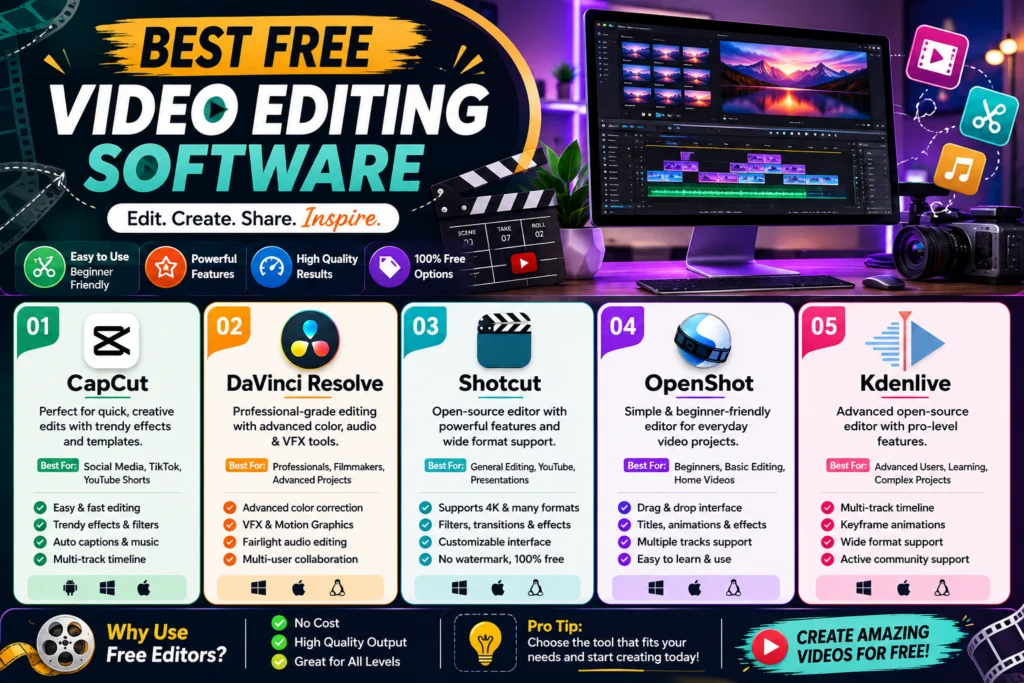
CapCut is great for those who want to record themselves and use the built-in features: effects, captions, and video editing. DaVinci Resolve will suit someone who wants to be engaged in serious projects, color correction, and visual effects (VFX). Shotcut is better for more straightforward work, and OpenShot is lighter. In turn, Kdenlive offers advanced options and an accessible interface. At the same time, the last two editors are excellent for learning all the intricacies of the process and getting professional results.
The main criterion for choosing which program to use will be its capabilities. At the same time, one should think about other factors: the performance of their own device, operating system, and the amount of time they are ready to invest in learning the software. It is essential to understand that simple editing software will be sufficient for some tasks. However, if one chooses the wrong editor, then they will be much less comfortable working with complex projects.
Therefore, free video editing software is suitable for any task, but only if one understands the abilities of the chosen editor and takes time to explore its features. Thus, one will be able to create beautiful effects and edits without spending a lot of money on a video editing program.