Introduction
Cloud storage provides a convenient way of storing, accessing, and sharing files from anywhere over the Internet. Unlike traditional methods of storing personal data on the local devices, cloud storage makes it easy to keep all your photos, documents, video recordings, school projects, and other important data in one place while being able to access it from any of your devices.
In addition, most providers offer both free and premium subscriptions with additional space for users who need it. However, each service has its own set of benefits, drawbacks, limits, and differences. The choice of the most suitable cloud storage provider depends on the amount of space needed and the specific tools and features required to manage the stored data. The current article discusses the most popular and convenient cloud storage services, their main benefits and drawbacks, and differences.
Whether you need to store some personal files, work on school or business projects in the cloud, or back up your data, you should know what advantages and disadvantages your intended provider has.
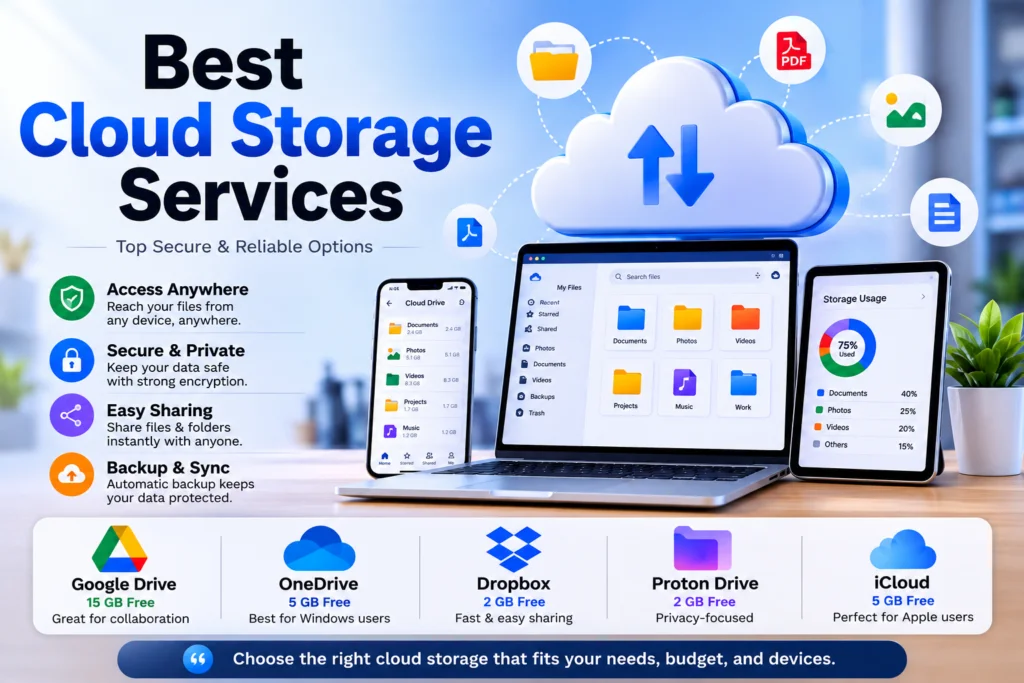
Picking out the right cloud storage service becomes a delicate balance between your ecosystem, collaborative needs, and privacy rules. Generally, the best choice falls in line with your operating system. Windows users get a lot of utility from OneDrive as it is deeply embedded into File Explorer and PC folders automatic backup.
At the same time, for Apple users the best option would be iCloud Drive, as it quietly synchronizes all photos, apps, and device backups on iPhones, iPads, and MacBooks. In case when simultaneous collaborative work is your priority, then nothing can beat Google Drive as far as it offers 15 gigabytes for free and provides a seamless web-based working environment where one can edit documents and spreadsheets simultaneously.
For those who care more about security than productivity suites, there are dedicated zero-knowledge platforms available to use. Such services as Proton Drive and Sync.com encrypt files on your computer before uploading them to the cloud. This means that no third party, even host platform, will be able to read any of your files. Those who do not want monthly billing can use such alternatives as pCloud, which gives unique lifetime subscription option and has powerful media streaming capabilities.
Ultimately, there is no universal service that would work perfectly for each user. Choosing the right cloud provider depends on your workflow. If you frequently switch devices, then the best solution would be using platform-independent services such as Dropbox as they give the most consistent cross-platform synchronization mechanisms. Free tiers from several services can be combined together in case of simple backup, however heavy media producers or business companies would need to pay money to purchase ecosystem for their hardware.
Google Drive
Also, another widespread service which is rather useful for the storing, accessing, and transferring the files is called Google Drive. This program is connected closely to the other programs from Google (Google Docs, Sheets, and Slides), and therefore is very convenient for the students, employees, and common users.
The files can be accessed on computers, smartphones, and tablets as far as there is an Internet connection and the user is authorized on his Google account. The program provides the opportunity to share the files and folders with other users and manage the actions which others can do with the files (edit the files or not).
The amount of storage offered by the free version of Google Drive is 15 GB; it is enough for all Google services – Google Drive, Gmail, and Google Photos. One can buy the Google One plans in case more storage is needed.
Google Drive is a top-notch cloud storage and collaboration service provider that perfectly integrates file syncing services with real-time digital productivity. All standard user accounts have access to the amazing 15GB of free storage space, which is shared dynamically between Google Drive, Gmail, and Google Photos.
Google Drive has been designed specifically for workplace collaborations and enables remote teams to collaborate on creating documents, spreadsheets, and presentations using their native online applications. In addition to file storage capabilities, Google Drive offers advanced search filters and AI features to enable you to find, analyze and extract information from complicated documents quickly.
Google Drive has flexible support for different setups and offers specific mobile applications and a desktop application, which streams cloud files to your computer without filling your local hard disk drive.
OneDrive
OneDrive is a very secure cloud storage that offers perfect file synchronization and solid integration with Windows. Every single Microsoft account includes 5 gigabytes of free storage space and is responsible for the automatic backup of desktop, documents, and pictures folders.
OneDrive is an excellent service in the field of productivity because of the native integration with the Microsoft Office 365 software allowing real-time collaboration in Word, Excel, and PowerPoint. For mobile devices, there are special applications that enable instant photo synchronization, PDF markup, and remote access to documents.
OneDrive places security as one of the main features of the service, which is clearly seen in the “Personal Vault”—a secure folder requiring multi-factor authentication for access to files. Operating perfectly on Windows, macOS, iOS, and Android, OneDrive becomes a comprehensive digital storage that combines local computer storage and cloud office.
Dropbox
Dropbox is a renowned standalone cloud storage solution that stands out on account of its unrivalled speed in file synchronization and its platform independence. While competing software services are confined to their respective operating systems, Dropbox operates independently and allows for flawless interoperability between Windows, Mac, iOS, and Android platforms.
Despite the fact that the free version of Dropbox provides merely 2 gigabytes of storage capacity, the platform offers a unique delta-sync mechanism that helps to transfer only those segments of a file that have been altered.
Dropbox shines when it comes to media collaboration due to its sophisticated file-sharing options, which include the ability to share protected links, set expiration dates for shared files, and collect assets from external clients securely. Dropbox also offers integrated workspaces where the user can edit his or her files with the help of online versions of Microsoft or Google applications.
A cloud storage service Dropbox was created to enable users’ online storage of their data; it can also synchronize and share files and manage collaboration on documents. The service allows the user to designate specific folders that should be automatically synchronized on all of the user’s devices. In addition, sharing files and folders through Dropbox is effortless, and the ability to send links to specific folders/files eliminates the need to attach large files to emails.
Dropbox offers collaboration and file-management instruments and is therefore popular among students, business professionals, independent workers, and others who want to store data online and synchronize it across devices and platforms. The Dropbox Basic edition provides only 2 GB of storage space, which is lesser than the storage space provided by similar services.
Therefore, the Dropbox cloud storage service is a great option for those who want to manage their files simply but do not require many additional services since the free account’s limited size may suffice for some users’ needs. However, the Dropbox cloud storage service is less attractive to users who want to store their photo, video, or backup collections in the cloud since 2 GB of free storage space may be inadequate for such users.
Proton Drive
Proton Drive is another product by Proton and a cloud storage solution that offers privacy to its users. Proton Drive uses encryption technologies to keep the files private and provide access to authorized users only.
This product can be considered as a perfect fit for the people that want extra privacy when storing their files online. It provides file sharing capabilities and works on compatible devices that enables users to use it as an everyday cloud storage solution.
There are three types of accounts in Proton Drive: a free one and two other accounts that have higher storage capacity and costs additional money. The main advantage of Proton Drive is privacy but it may not be suitable for people who prefer collaboration features over everything else.
Proton Drive is an encrypted cloud storage solution built to ensure complete privacy for those individuals who seek full data protection in their cloud storage. Being governed by strict Swiss privacy laws, the service relies on the use of end-to-end zero-knowledge encryption that makes sure all the files, file names, and metadata are encrypted on your device prior to sending them to the cloud.
It ensures that neither you nor any third parties, including the company itself, have access to any of your information. The service comes with a free 2 gigabytes package that is easily upgradeable to 5 gigabytes by performing some onboarding tasks. The user will also get Proton Docs that provide the possibility of working with entirely encrypted documents.
iCloud
iCloud refers to the cloud storage and synchronization services offered by Apple that are supposed to work seamlessly with the iPhones, iPads, Macs, and other devices from the Apple portfolio. With iCloud, it is possible to make an automatic storage and synchronization of photos, contacts, documents, backups, and numerous other data types through the devices under one and the same Apple ID.
iCloud is rather useful for those people working on the Apple hardware since most of its capabilities could be applied automatically. The free plan of iCloud provides 5 GB of space that could be utilized for storing iCloud Photos, backups, documents, and other data types. For those individuals, who require more space, it would be necessary to get the iCloud+ plan, which also comes with the added security and privacy options.
iCloud is a really good option for those people, who are currently working with the Apple hardware and require convenient synchronization and backups. Nevertheless, the free storage capacity of iCloud could be exhausted rather quickly, especially for those users, who have a lot of photos and frequent backups of devices.
Don’t miss this related post:
9 Best Free Video Editing Software
Android Phone Running Slow? 7 Easy Fixes
Best Budget Laptops for Students: 10 Best Picks
How to Free Up Android Storage: 10 Easy Ways
Conclusion
The use of cloud storage services makes it easier to store, back up, sync and share files across several devices. Google Drive is the best cloud storage for people using Google products. On the other hand, OneDrive is the best cloud storage service for people using Windows and Microsoft 365. Dropbox is famous because of its ability to sync and share files. Proton Drive is the best cloud storage for people that value their privacy. iCloud is a useful cloud storage for people using Apple products and wanting to sync their files easily.
There are many differences between the available cloud storage services regarding storage space, features, pricing and privacy, among others. Therefore, the best cloud storage service has to be selected based on the user’s needs. This is because the selection of the best service depends on the storage space required by the users and devices used among others.
It is important to understand how the proper cloud storage can be chosen by combining your hardware and the desired privacy. Popular cloud storage solutions such as Google Drive and Microsoft OneDrive have great productivity potential due to office software integration and high compatibility with Android and Windows.
At the same time, iCloud offers its services transparently, helping to keep your iOS and macOS in perfect sync. Those who need pure speed and cross-platform performance might opt for Dropbox because of its fast delta sync technology and file sharing tools. As an option for those, who prefer complete digital sovereignty, Proton Drive provides zero knowledge encryption with no access to the files from any third party.
The wisest thing is not to search for an absolutely perfect platform but choose the one according to your hardware and privacy needs and budget.