Introduction
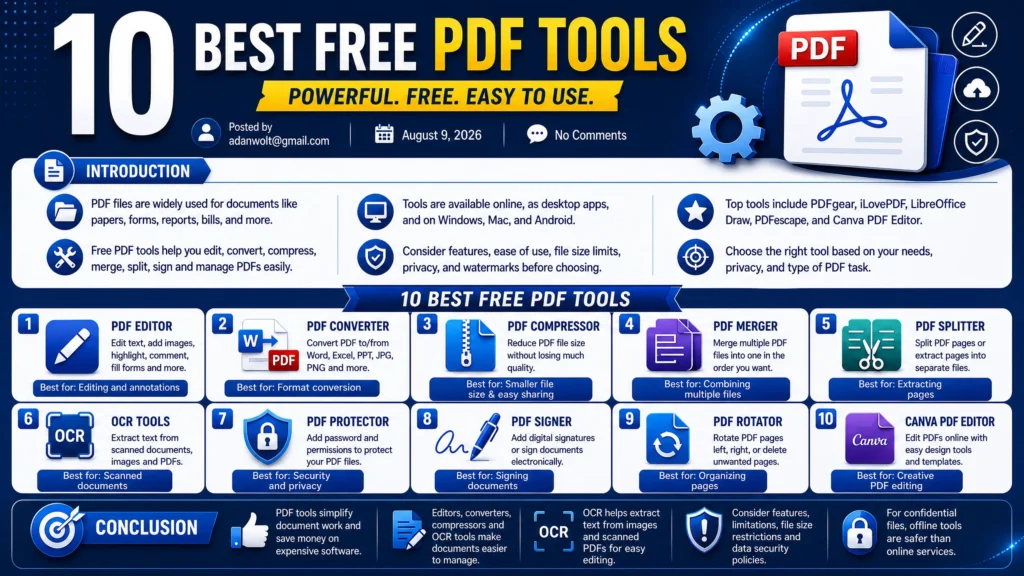
PDF files are commonly employed in the creation of various forms of documentation such as papers, assignments, forms, reports, bills, and more. Nevertheless, in cases where the need arises to manipulate PDFs through editing, conversion, compression, merging, splitting or signing the files, there are several free PDF tools that can accomplish all of this without the need for costly software applications.
The available free PDF tools include those that operate via the web browser as well as applications that can be installed onto a computer running on Windows and Mac OS as well as those running on Android.
There are different aspects one should take into account when choosing among the free PDF tools like features, ease of use, maximum file sizes, privacy and the inclusion of watermarks in exported PDF files. The following is an analysis of some of the best free PDF tools along with their specific uses.
Top free PDF solutions include the PDFgear software, which is the complete offline desktop editing tool, and the iLovePDF website that provides fast online editing services. PDFgear eliminates the need for any expensive editor as it enables the user to edit any existing text right in the document, extract scanned content through Optical Character Recognition technology and utilizes the AI Copilot to summarize long PDFs without any charge or watermarking.
To get the most efficient browser-based process without having to install anything, iLovePDF comes up with more than 20 tools to split, merge, compress and convert documents from one format to another such as Word or Excel, but it sets up a restriction of 15 megabytes per file for free users. In case your top priority is data security, then you might choose the LibreOffice Draw software as 100% offline program that allows to import PDF files into editable graphic vector layouts or the PDFescape browser-based platform designed specially for completing forms, adding whiteouts and signatures. Finally, if your document is very graphic, then Canva PDF Editor will make the work easy by breaking it down.
PDF Editor
A PDF editor is designed to make changes to the PDF documents without having to make the document from scratch again. There are several free PDF editors which can help one add text to the document, insert images, highlight some parts of the information, fill up forms in the document, comment on the documents and other minor changes to the existing documents. There are several PDF editors which offer options for changing the position of the page and deletion of the pages, while there are other editing services which require subscription. In selecting the best free PDF editor, you should see if it offers the service that you want and if there are any restrictions regarding the size of the files or the number of the times that you will be making the change. While browser-based PDF editors are easy to use since no installation is required, while desktop applications are preferred for confidential information since the file does not leave your computer.
Choosing the appropriate PDF editor involves making the determination on the need of using a specific desktop software to edit texts structurally or a web utility to manipulate files instantly.
Desktop software such as PDFgear and Adobe Acrobat Pro have powerful features such as offline text editing, documents protection, and accurate Optical Character Recognition (OCR) to edit scanned sheets without putting your personal information at risk.
PDFgear is a free desktop software where you can type over the original text and use an artificial intelligence (AI) summary tool without any watermarks, whereas Adobe Acrobat Pro is an industry-standard for enterprise redaction, digital certificates, and advanced form automation.
On the other hand, web utilities like iLovePDF and Sejda are more useful in manipulating files fast, such as merging, splitting, or altering text in the web browser. The free version of Sejda allows you to edit directly text up to three times per day and has cloud deletion within two hours after each task in order to preserve the users’ privacy, whereas iLovePDF has over twenty rapid file conversion tools for regular document management.
In conclusion, browser tools like PDFescape offer a simple zero cost layout to place text fields, tick checkboxes, and sign documents online.
PDF Converter
A PDF converter is used to convert PDFs to other file types or convert any document and images to PDF. It will help when you need to modify your PDF files in MS Word, extract data for further processing, or create PDF documents from your documents, spreadsheets, or images.
Most of the free PDF converters are capable of converting to/from commonly used file types like Word, Excel, Power Point, JPG, and PNG. Online PDF converters are easy to use since they can work in your browser without needing the installation of special software. Free PDF converters can have some limitations regarding the size of files or number of files converted at one time. When you convert a PDF to another type, make sure that the formatting, images, tables, and text of the resulting file are correct. You should not use free online converters when working with confidential files since it means that your files will be uploaded to some unknown site.
It is essential to identify whether one needs a desktop application dedicated solely to the task or an online tool for simple and fast conversions. Online PDF converters such as iLovePDF and CloudConvert do not require installations and function on all types of devices.
These converters are highly suitable for converting Microsoft Office files and uncommon vector or CAD formats into well-designed PDF pages in seconds. Nevertheless, online converters tend to have limited file size restrictions and upload your data to external servers, while offline PDF conversion tools like PDFgear and Adobe Acrobat Pro ensure your privacy and process huge files without any need for internet connection.
PDFgear can be regarded as the only offline program which does not require any payment and provides unlimited batch processing as well as OCR support which allows users to turn scanned image files into fully searchable PDFs without applying any watermarks.
Additionally, Adobe Acrobat Pro is considered as the most advanced tool and represents an enterprise-level standard which provides the highest degree of precision in retaining table layouts during conversion from PDF to Word or Excel format. In addition to all mentioned above, Calibre software is an open-source desktop application which performs the role of the best solution for converting PDF documents into EPUB and MOBI formats.
PDF Compressor
A PDF compressor reduces the size of a PDF file, usually without sacrificing much in terms of quality. The need for compressing PDF files usually arises when one has a PDF that is too big to send or upload somewhere, or save on one’s computer. There are several free PDF compressors both online and as downloadable desktop applications. Most of them provide several levels of compression, so that the user can choose between reducing file size and preserving image quality.
In particular, when compressing PDFs with photos or scans, one usually has to choose between smaller file size and image clarity. When it comes to text-based PDFs, compression can usually be applied with little loss of readability. It is especially important to view the compressed file after compression to make sure that everything is in order – pages, images, hyperlinks, or anything else that the original file might have had.
When dealing with sensitive information, it might be a good idea to use a PDF compressor downloaded on one’s computer rather than using an online service. A competent PDF compressor can be very helpful in day-to-day computing by reducing the size of PDFs to make them easier to send over email or store on devices.
In order to pick a proper PDF compressor, one needs to know whether they need an online application for quick document optimization or an offline desktop program for reducing the size of huge files, which might contain important data. Online PDF compressors, such as iLovePDF and Smallpdf, do not involve installing any software since they allow compressing standard-size contracts and resumes within a web-browser right from the start.
While this type of programs is extremely convenient, they usually place some restrictions on the size of files and require uploading the data on third-party cloud servers, while offline desktop applications such as PDFgear and Adobe Acrobat Pro work with files of unlimited size without compromising your data privacy.
PDFgear is the best free offline solution to compress your files and offers several degrees of compression, including low, medium, and high. This way you can significantly decrease the size of the file without any watermarks and compromising text legibility.
Additionally, there is a top-class commercial application called Adobe Acrobat Pro that provides advanced options to optimize your PDF files manually by changing resolution of the included images, eliminating unnecessary fonts, and removing unnecessary hidden information from it. Finally, there are open source PDF compression software such as PDF24 Creator that allows customizing compression options and optimizing the quality and resolution of the embedded images.
PDF Merger
A PDF merger software merges several PDF documents into one. It is especially helpful if you have several pages, assignments, reports, receipts or any other project documentation in different files and need to put them together in one.
In most free PDF merger software, you can upload your several files, set the order as you like, and merge them just by clicking a button. Also, some software allows you to rotate pages, delete unnecessary pages, change page order and create a document from this.
It is very handy to use online PDF merger as it works directly in the browser, although using a desktop application would be better when working with sensitive information that you do not want to upload to a third-party service. Finally, make sure that all pages are placed in the right order and that nothing has been missed after merging the documents.
Choosing a good PDF merge tool depends on whether you would like a web-based application that merges files instantly or an offline application for dealing with large sets of documents securely. Web-based applications do not require any installations and will work on any operating system, providing a quick way to combine several documents such as invoices or CVs on the go. But there is usually a limit to the file size or the number of documents that can be merged using web services, and all files must be uploaded online.
OCR Tools
OCR software enables text recognition in scanned documents, photos, screenshots, and even in PDF pictures. The feature is especially valuable for students, offices and any person who is required to work with text in printed documents without entering all the data manually. Free OCR tools can recognize text in different languages and allow to copy the recognized text to Word, notepad or any other application.
Some PDF tools come with OCR included, while there are some standalone applications or online services providing this function separately. The efficiency of OCR recognition can depend on quality of pictures, font, language and formatting of documents. Good, clear and high-resolution pictures give more accurate results comparing to low-quality and blurry pictures.
In any case, after the text recognition it is always recommended to check the result since OCR can sometimes make mistakes in reading numbers or characters. In case of sensitive documents it is better to use reliable offline OCR tool instead of any online service.
In order to pick up the best OCR solution, it is critical to determine whether you need stand-alone software for massive scanning and processing of sensitive information or a web-based solution for extracting text fast.
The online OCR services, including OnlineOCR and iLovePDF, are the best choice when it comes to digitization of some scanned receipts or photos since it does not imply any installation process. However, the online solutions are characterized by certain limitations, namely file size and security concerns, so consider PDFgear and Microsoft Power Toys Text Extractor as alternatives.
It is possible to be sure in security of your documents using the above-mentioned software as they work offline. In its turn, PDFgear is the effective package of PDF tools which will be able to scan and extract text from scanned documents and convert them into PDF with no watermarks and costs. Microsoft Power Toys Text Extractor is a useful utility which belongs to the greater MS Power Toys application and allows extracting text from any picture, video frame or visual object in a computer program.
If you need a complex OCR solution with a wide range of additional functions, ABBYY FineReader and Adobe Acrobat Pro OCR software allow preserving the layout of the original file and effectively recognize text, graphics and annotations.
Don’t miss this related post:
7 Best Cloud Storage Services
Keyboard Shortcuts: 15 Essential Keys
7 Best Browser Extensions for Productivity
Best Budget Laptops for Students: 10 Best Picks
Conclusion
The advantages of using PDF tools are obvious in every activity related to documents. They make the process much easier and eliminate the need to spend extra money on additional software.
For example, special PDF editors allow users to make necessary changes to documents or add comments. Converters can change files into different formats, while compressors reduce their size.
Another useful feature is OCR software. It can extract text from images or previously scanned PDF files, making the information easier to edit and reuse.
However, it is still necessary to consider the usefulness and efficiency of a PDF tool before choosing it. Users should also pay attention to limitations such as file size restrictions and data security policies.
To protect confidential information, users can choose an offline PDF program instead of an online tool. This can provide greater control over sensitive documents and reduce the need to upload private files to external services.